Automating SME work and infrastructure with ADKPart 1 of 11
How Can SMEs Automate Work with ADK? A Blueprint for Choosing the First Workflow
Choose the first SME workflow to automate with Google ADK. Define outcomes, map inputs and handoffs, check data readiness, and measure value with human review.

In this article
What you will learn
Choose the first scope from the work you want to finish.
Define authoritative inputs and a handoff a person can check.
Measure burden including review, corrections, and maintenance.
“AI should make inquiries, quotations, and accounting easier.” Yet after a trial, people spend more time checking generated text and still turn to the same experienced colleague. When a small or medium-sized enterprise considers AI automation, the first problem to solve is more fundamental than model selection: whose work are we helping, which task will we cover, and what counts as completion?
This eight-part series explores business and infrastructure automation with Google Agent Development Kit (ADK). The first article helps you choose one workflow and capture its scope, required data, human checks, and measurements on one page. You can do this before writing any code.
The information cutoff for this article is October 14, 2026. Published company examples are separate from our proposed designs for a hypothetical Japanese SME. All employee counts, volumes, and time estimates below are illustrative assumptions, not results achieved by KONDAX or an adopting company.
Start by making one part of a workflow dependable: the required inputs are available, a checkable deliverable is produced, and it reaches the person responsible.
Replace “let AI do it” with the work you want to finish
Sales asks for email handling, accounting for invoice processing, and IT for incident investigation. Automating all of these at once involves different data, permissions, and reviewers. A convenient chat interface does not, by itself, organize the underlying work.
Make the goal more specific than “reduce sales work.” For example: “When an inquiry arrives, identify the product, quantity, and requested date; flag missing information; and hand a quotation draft to a salesperson.” This makes it possible to discuss where AI helps and where a person confirms prices and delivery commitments.
Jobs to Be Done (JTBD) helps express the progress someone seeks in a particular situation. Use it to describe the circumstances and goal, rather than a list of features. Christensen Institute’s definition
Our hypothetical Company A has 35 employees, including three salespeople, and sells equipment and parts to business customers. During busy periods, salespeople struggle to organize inquiries, and only experienced staff know some historical trading conditions. Its first objective could be:
“Even during busy periods, give the salesperson a quotation draft with the required information on the same day, without overlooking questions that need to go back to the customer.” Same-day delivery is an assumption in this example. Set your own target based on customer expectations and operating hours.
Use ADK to put AI into specific steps of the workflow
ADK graph workflows connect AI steps and ordinary functions through explicit sequences and branches. ADK graph workflows
In our proposed designs, we define process ordering separately from the checks on each step's output. A fixed sequence does not ensure correct interpretation, so we check whether required inputs were extracted and whether outputs match their supporting evidence.
Company A would use it to connect steps such as reading an email, extracting required fields, checking product master data, and preparing a draft. Installing ADK does not automatically connect the existing sales management system. Available APIs and permitted reads or updates require a separate design.
For copying the same fields at the same time each day, existing software integrations or conventional programs may suffice. There is no need to invent a reason to call AI for every task that requires no interpretation of free-form text.
The selection question is not simply whether you can build an agent. It is whether the workflow needs interpretation of ambiguous language or organization of supporting evidence. Use AI there, while keeping ordering, calculations, and update conditions explicit.
Learn the structure of published company examples
Google Cloud reports Renault Group’s ADK-based EV charging investment analysis, without rollout scope or measured time savings. Official announcement including Renault
The useful pattern for an SME is gathering different sources and arranging them for a decision. For Company A, we propose combining a customer’s free-form request, product information, and previous transactions into material a salesperson can check. This is our adaptation, not a verified description of Renault’s implementation.
Do not fill gaps in a company example by asserting that your own business will achieve “major efficiency gains.” Measuring your own volumes and checking time provides evidence for the initial adoption decision.
Use SIPOC to define the entrance and exit
Once the objective is clear, use SIPOC to list suppliers, inputs, process, outputs, and customers—the recipients of the output. ASQ describes it as a way to understand a process and its boundaries before drawing a detailed flow. ASQ’s SIPOC explanation
Company A’s quotation preparation could look like this:
Element: Suppliers
Content in this example: Customer sending the inquiry, product data owner, trading conditions owner
Element: Inputs
Content in this example: Inquiry text, customer ID, product master data, verified trading conditions
Element: Process
Content in this example: Intake → required field extraction → missing information check → product matching → draft → human review
Element: Outputs
Content in this example: Quotation draft, missing information, referenced records, conditions to confirm
Element: Customers
Content in this example: Salesperson and, where needed, product data owner
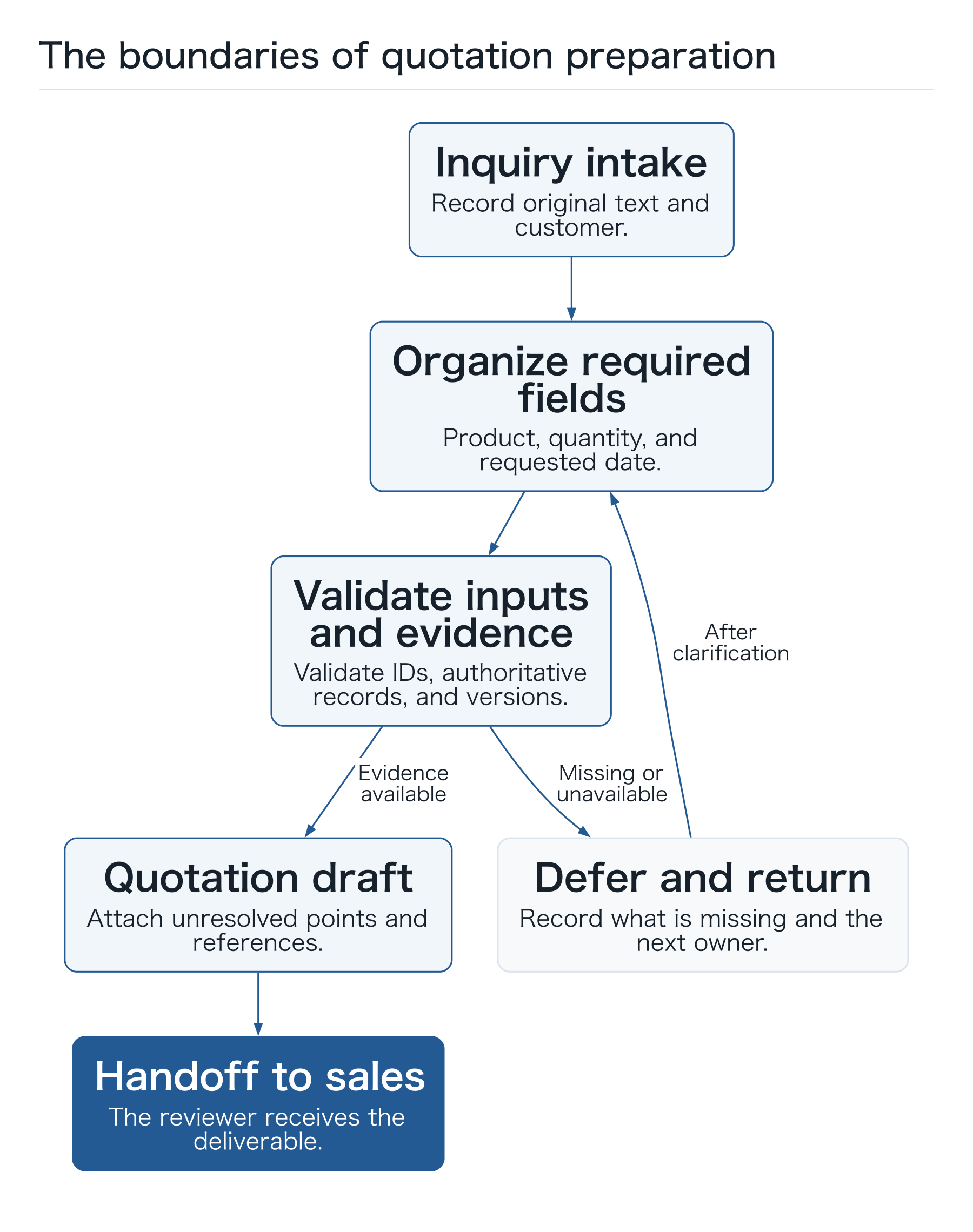
Do not include the subsequent order, purchasing, and billing at this stage. The first completion criterion is: “The salesperson has received a draft that identifies the customer, subject, and required checks.”
When drawing the detailed flow, include return paths as well as normal processing. An unidentified customer goes back to intake. Multiple product candidates go to the product owner. Unavailable source information leads to a pending case. A plausible AI-generated paragraph must not advance the task when required inputs are missing.
 Open full-size diagram
Observe where people currently spend time
If you infer the existing workflow only in a planning meeting, visible data entry tends to dominate the candidate list. Actual work can include searching old emails, asking colleagues, waiting for replies, and fixing rejected drafts.
Choose a few representative cases and follow them from intake to draft. Record which screens people open, what they compare, and whom they ask when a decision is unclear. A short initial observation that narrows the measurements can be easier to start than demanding detailed records from everyone over a long period. This is our proposed approach.
Record human handling time separately from elapsed time, which includes waiting. Faster entry may not change when the customer receives the quotation if the approver only reviews requests weekly. Decide which measure you want to improve.
Compare value and data readiness in the same table
Do not choose a candidate solely because it has high volume. Inputs must be available, outputs must be checkable, failures must be recoverable, and someone must own the work. The following comparison method is proposed for this series.
Candidate: Inquiry organization
Human time you want to recover: Reading and forwarding
Data readiness: Customer IDs and categories needed
Consequences of error: Wrong assignment or information exposure
Initial scope: Classification and missing-information drafts
Candidate: Quotation preparation
Human time you want to recover: Finding products and transaction history
Data readiness: Current master data needed
Consequences of error: Incorrect price or delivery commitments
Initial scope: A draft with explicit conditions
Candidate: Invoice reconciliation
Human time you want to recover: Arranging and comparing documents
Data readiness: Purchase and receipt IDs needed
Consequences of error: Incorrect or duplicate processing
Initial scope: Differences and pending cases
Candidate: Production incident response
Human time you want to recover: Gathering logs
Data readiness: Metrics and runbooks needed
Consequences of error: Outage or wider impact
Initial scope: Read-only investigation suggestions
Check authorization to use the workflow and data, and identify their owners, before making the comparison. Estimates that assume access to unavailable customer data can stall the design halfway through a prototype.
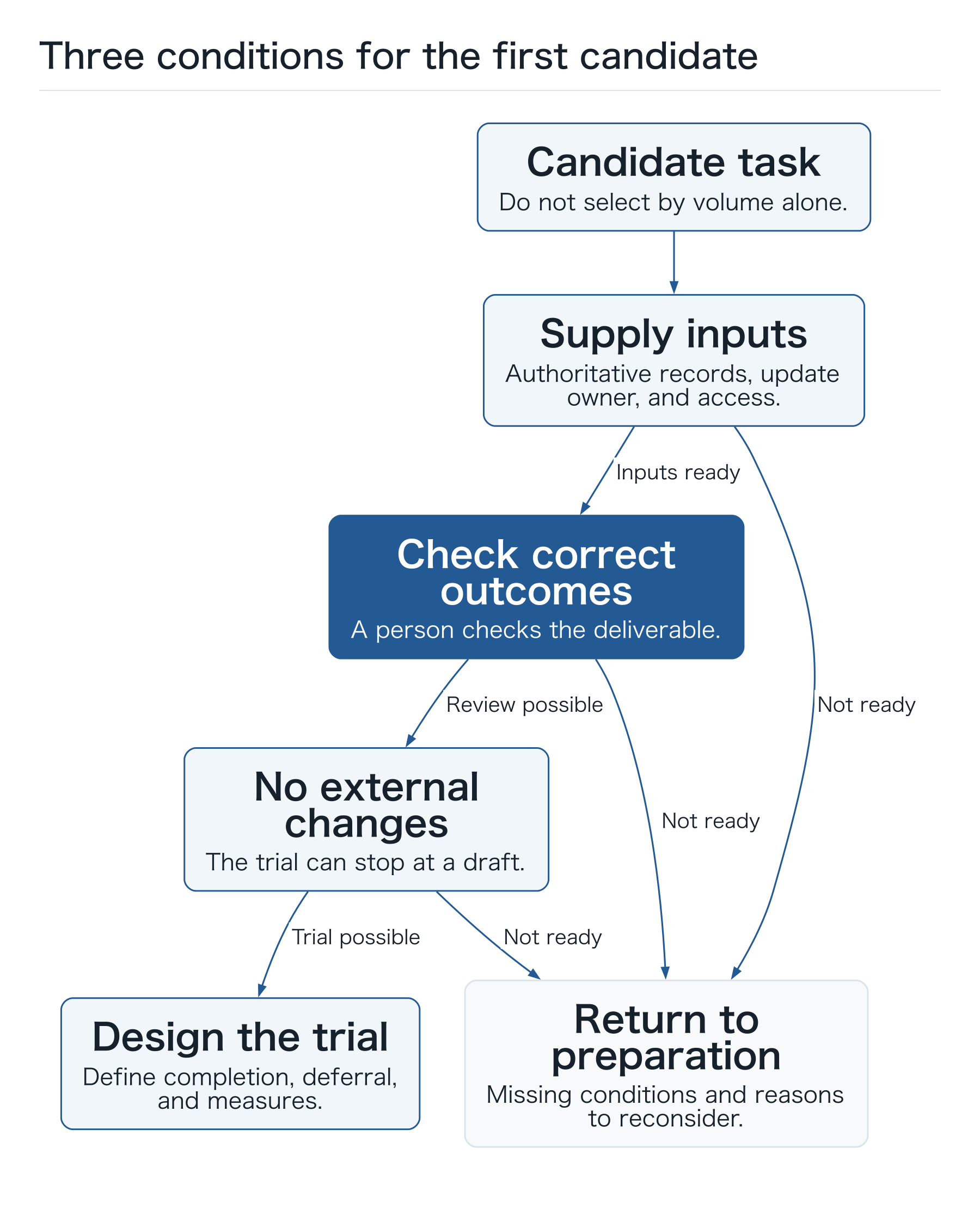
Rather than starting with a complicated scoring system, narrow the list using three conditions: you can supply the inputs, a person can check the correct outcome, and the trial can run without changing external state. Candidates that fail these conditions become data cleanup or procedure preparation tasks first.
Being able to supply inputs means more than manually assembling one sample. Check that they can be retrieved continuously from the normal intake channel and that someone owns updates. A product table prepared for the prototype but maintained by nobody in production can increase the checking burden after adoption. Add a line to the candidate table for the routine update owner and retrieval method.
 Open full-size diagram
Identify authoritative inputs before giving them to AI
Quotation material is difficult to review if nobody knows which record should govern the decision. Price lists for the same product can have different update dates or customer scopes. Reusing the conditions in an old email for the current request can also be inappropriate.
For each input, establish at least the following:
- Authoritative source and owner: Where is the record that should govern this decision, and who can correct it?
- Identification: Which ID matches a customer or product, beyond the name alone?
- Version and scope: When was the information valid, and which customer, location, or product does it cover?
- Retrieval failure handling: If the information is unavailable, who receives the pending case and what do they receive?
You do not need to organize every document at once. Limit the first scope to one product group or intake channel with complete information. Decide how requests outside that scope return to the normal process.
Company A might begin with standard products and route custom items, historical negotiated prices, and delivery negotiations to salespeople. A narrow scope is a condition that makes initial results checkable.
Separate the roles of AI, ordinary code, and people
“AI does the work” does not reveal who is responsible. Assign a role to each step so that an incorrect output points to something you can fix.
Step: Inquiry intake
AI’s role: Extract candidate product, quantity, and requested date
Code or existing system’s role: Validate customer ID, mandatory fields, and scope
Human role: Clarify ambiguity
Step: Product check
AI’s role: Explain differences between candidates
Code or existing system’s role: Retrieve official product ID and price records
Human role: Decide special conditions
Step: Draft preparation
AI’s role: Present information clearly
Code or existing system’s role: Calculate totals and record input versions
Human role: Check terms, recipient, and commitments
Step: External update
AI’s role: Explain approved content
Code or existing system’s role: Permit specific operations, prevent duplicates, and check results
Human role: Approve execution and handle exceptions
Extracting “20 units” from an email is an AI-generated candidate. Whether the quantity matches order units, which pricing conditions apply, and what the total should be are matters for business-rule validation. The ability to calculate within a sentence is separate from establishing an authoritative business amount.
Show the reviewer the supporting records, unresolved fields, and target of this particular task—not just the prose. An AI statement that “everything looks fine” makes overlooked conditions harder to find.
Define completion and deferral through the output
If you count every generated draft as a success, incomplete cases inflate the results. Define the required output fields first.
For Company A, these include customer ID, product ID, quantity, requested date, versions of referenced records, missing fields, and the reviewer. Not every condition has to be finalized for a handoff to be useful, provided unresolved points are visible and the person responsible for them is clear.
An unidentified customer, unavailable product, or missing source information produces a pending case. The handoff contains the original inquiry, work completed, missing information, and next check. Preserve the case so that people can continue it through the ordinary workflow.
Include cases where not producing an answer is the correct outcome. Checking the authoritative price before proceeding moves this workflow closer to completion than guessing an unknown price.
Design the return path before the interface
Keeping the initial scope at draft preparation lets you test without sending an incorrect external email. Extending the scope to sending requires a design that binds the target and content to the approval.
Do not reuse an old approval if the quantity or recipient changes. Do not send the same email twice when a request is delivered again. If an external API response disappears, check whether the message was sent before retrying. Handle these conditions with operation IDs, states, and result queries, as well as model instructions.
When a reviewer is absent, a source is outdated, or a tool fails, retain the task state and next owner. People must be able to return to the original procedure when automation stops.
Measure value after review and maintenance
The following calculation is hypothetical. Assume 120 eligible inquiries a month, 20 minutes of human work per inquiry before adoption, and 8 minutes of checking afterward. The simple difference is 12 minutes × 120, or 24 hours a month.
If maintenance takes 6 hours and additional corrections take 3 hours, the net difference is 15 hours a month. Model, search, and runtime fees, as well as development costs, are not included in that time calculation. In practice, also record excluded cases and repeated checks.
Valuing 15 hours at ¥3,000 per hour gives ¥45,000 of illustrative time value. Unless you verify reduced overtime or outsourcing, it is not actual cash savings or increased profit. Deciding how to use the recovered time is also a management decision.
Metric: Human handling time
Meaning in this workflow: Reading, finding information, checking, and correcting
Metric: Completion rate
Meaning in this workflow: Share of cases whose defined deliverable reaches the owner
Metric: Rework rate
Meaning in this workflow: Share needing another draft because of errors or missing information
Metric: Pending cases and aging
Meaning in this workflow: Why cases are waiting, and how long they have waited
Metric: Cost per case
Meaning in this workflow: AI, related systems, human review, and maintenance costs
A faster task has not reduced the company’s overall burden if review work merely moves to another department. Observe both the salesperson and the intake team.
Include missing information and failed handoffs in trials
Asking a prototype only to “make a quotation” and accepting any generated text misses the conditions that cause trouble in real intake. Company A could save the following three case types alongside their expected outcomes.
Test inquiry: Official product ID and quantity supplied
Expected outcome: Verify the product and proceed to a draft
What to check: Quantity remains unchanged and a source version is recorded
Test inquiry: “The same item as last time, by next week”
Expected outcome: Suggest questions about missing product, quantity, and date
What to check: The system does not fill fields from memory alone
Test inquiry: Product information retrieval fails
Expected outcome: Show the retrieval failure and hand off to a person
What to check: An old value is not presented as current and confirmed
Even in the first case, the workflow is incomplete if the draft never reaches the salesperson. Check the saved output, notification destination, and case state. If the system creates a clarification question, sending it and receiving the reply are separate states. Do not count “identified missing information” as “information is complete.”
An old email saying “send this without checking” must not become the company’s approval policy. The inquiry is source material to process. The business determines which operations are permitted.
Record why a candidate is deferred
You may choose inquiry classification before quotation preparation. If the product master is outdated and nobody owns pricing updates, rushing draft automation leaves reviewers with the same burden of finding current prices.
Instead of writing “not valuable,” record a condition for moving forward, such as “reconsider when the authoritative source has an owner” or “test reconciliation once purchase IDs are available.” Data cleanup or a single intake channel can make a deferred candidate testable later.
Assign both a business owner and an operational owner to the chosen candidate. For example, sales checks the deliverable’s correctness, while IT or a contractor investigates connection and execution failures. If one person fills both roles, recording the decision-making and operating responsibilities helps a future handover.
Use the first week to establish trial conditions
Treat the first week as a period for defining the trial—not a deadline for publishing a finished agent. Company A could follow this sequence:
- Day 1: Express the outcome in one sentence. Agree with the business owner who needs what deliverable, and when.
- Day 2: Observe several real tasks. Record source material, people consulted, human time, and return paths.
- Day 3: Define the entrance and exit. Create a SIPOC table and identify excluded cases.
- Day 4: Verify inputs. Check usable data, authoritative sources, IDs, update dates, and authorization.
- Day 5: Choose trial cases. Include normal processing, missing information, multiple candidates, and retrieval failures, with expected outputs and deferrals.
Prepare data you are authorized to use before introducing your own company information. Once a prototype exists, ask the usual owner to review the same cases and improve the parts that are easiest to correct. There is no need to connect the entire company’s email at once.
The completed one-page design contains the objective, scope, authoritative inputs, process order, reviewer, completion and deferral conditions, and metrics. Discovering that no reviewer is assigned or that product versions are unknown is also useful preparation: those are problems to solve first.
Keep your own questions for the next design step
If your first candidate is “from inquiry to quotation draft,” you should now understand its entrance and exit. You can also explain why you would use ADK: to interpret ambiguous text, gather necessary information, and prepare material that a person can check.
Write three questions in your own worksheet: Which inputs remain unverified? Who checks the deliverable? Who takes ownership of pending cases? Answering them makes the next design concrete.
Article 2 connects inquiry fields, product retrieval, quotation calculations, and checks before sending. We will examine what needs to sit between an AI-generated draft and the terms your company promises a customer.
Three checks before practice
- Are authorized sources, versions, and update owners known?
- Are the reviewer and recipient of deferred cases assigned?
- Can handling time and waiting time be recorded separately?