Automating SME work and infrastructure with ADKPart 2 of 11
From Inquiry to Quotation: Connecting Sales Preparation Work with ADK
Connect inquiry intake, catalog lookups, and quotation preparation with ADK. Design human approvals, handle exceptions, and measure time, cost, and accuracy.

In this article
What you will learn
Connect extraction, retrieval, calculation, and review in order.
Keep unanswered schedules and discounts unconfirmed.
Bind approval to the worksheet version and target.
Read the inquiry, search previous jobs, open the product catalog, and ask someone about availability. Before preparing a quotation, a salesperson may switch screens several times. When an inquiry falls behind on a busy day, the problem may be scattered information rather than a lack of attention to the customer.
Connecting these preparation steps is one possible use of Google's Agent Development Kit, or ADK. In this article, we design a process that organizes an inquiry, retrieves internal information, and produces a quotation preparation worksheet that a salesperson can review. We start by assembling the information needed for a decision, before delegating the issuance of a formal quotation or the sending of an email.
The technical information and public example were checked as of October 14, 2026. The SME, amounts, and case counts below are hypothetical examples. They are not implementations or results achieved by KONDAX or its clients.
The first milestone is a quotation preparation worksheet whose evidence the salesperson can check, rather than an AI system sending a quotation.
Separate information preparation from decisions that make commitments
An inquiry mixes requests, facts, and ambiguous language. “The same as last time, urgently,” “roughly last year's budget,” and “by next month” need to be unpacked into product identifiers, quantities, requested dates, and questions. AI can help with this interpretation. A fluent answer, however, cannot establish which price applies, whether a discount is authorized, or whether a delivery date can be promised.
We therefore give AI responsibility for interpretation and explanation, while fixing pricing and discount decisions in ordinary code and existing business rules. Conditions that require a salesperson's decision remain pending approval. If the existing quotation system is the authoritative source of prices, the agent retrieves prices for each case instead of memorizing a second price list.
Work: Organize the request from the email
Main owner: AI
Reviewable output: Fields linked to the original text, unresolved questions
Work: Retrieve customer, product, and pricing information
Main owner: Tools with limited permissions
Reviewable output: Identifiers, values, retrieval times, source versions
Work: Apply price, discount, and approval rules
Main owner: Ordinary code
Reviewable output: Rules applied and reasons for the result
Work: Decide scope, schedule, and customer-facing documents
Main owner: Salesperson
Reviewable output: Approved content and the version approved
With this division, improving extraction does not change discount authority. If the interpretation is wrong, the team can identify the field that needs correction. Clear responsibility boundaries also make an initial trial easier for staff than an attempt to automate everything around the quotation at once.
What a public example teaches about connecting evidence
Google's April 9, 2025 announcement reports Renault Group using ADK to combine geographic, zoning, and traffic data for EV charging investment analysis. This is an analyst-support example, not a sales quotation deployment. The source provides no rollout scope or measured time-saving rate. Google Cloud announcement
The transferable pattern is assembling information from several sources and giving a decision-maker the evidence. The intake worksheet and approval process below are this article's proposed design for an SME. They are not a claim that the company in the public example uses this quotation workflow.
Start with one kind of inquiry
Consider the series' hypothetical “Case Company A,” a business-to-business equipment and parts supplier with 35 employees. For this article, assume that three people work in sales. The initial scope is replacement-part inquiries from existing customers. New accounts, custom products, and jobs requiring an investigation of installation conditions are routed to a salesperson with an intake worksheet. In smaller businesses, knowledge can be concentrated in one person; limiting scope helps avoid trying to replace that judgment prematurely.
When selecting the scope, check whether the source information exists, not just how many inquiries arrive. An old price list with no product identifiers will not produce stable lookups simply because AI has been introduced. Preparing a product register, price validity periods, customer identifiers, and contacts for schedule questions is part of the adoption work.
Define completion in advance. Here it means having the required fields and evidence for an existing customer's replacement-part inquiry so that a salesperson can proceed with preparing a quotation. Measuring only how quickly a reply draft appears can hide incorrect quantities, outdated prices, and excessive delivery commitments.
You can start without automatically retrieving email
Initially, a salesperson can select a relevant email and paste it into an internal screen. There is no need to import every message in a shared inbox before deciding whose messages and which attachments the system may read. Establish who submits cases, which customers are in scope, and where records are stored. Then try a few practice cases to check whether the intake worksheet is useful.
Map information handoffs before building
Telling an IT colleague to “automate quotations” does not identify the price-list owner or who should investigate an unanswered schedule question. Use a handoff worksheet to name the supplier, input, process, output, and recipient. A complex diagram is unnecessary: follow one actual inquiry and fill in the table.
Information provider: Customer or intake staff
Input: Original email, attachments, intake ID
Work performed: Organize requests and missing information
Handoff: Intake worksheet linked to the original text
Recipient: Salesperson
Information provider: Product and pricing owners
Input: Current registers and applicability conditions
Work performed: Retrieve identifiers and versions
Handoff: Evidence-backed prices and specifications
Recipient: Calculation process and salesperson
Information provider: Inventory and service staff
Input: Allocation information and service-slot responses
Work performed: Check the relationship to the requested date
Handoff: Confirmed conditions and unanswered items
Recipient: Salesperson
Information provider: Salesperson and approver
Input: Preparation worksheet and discount request
Work performed: Review and approve conditions
Handoff: Content that may be issued, with its version
Recipient: Quotation issuer
This is a proposed worksheet for the hypothetical company. For each row, add the person responsible for updates, the contact to use when no answer is available, and the acceptable waiting period. If a pricing owner updates a price without communicating its effective date, the handoff is already faulty before AI is introduced. Improving notification and retrieval first reduces the defects that automation inherits.
Nor does every customer request remain inside a single email. When terms change by phone, the salesperson updates the worksheet and records what was discussed and changed. An agent that has read the email should not be expected to know an agreement reached on the phone. Keeping the authoritative record attached to the case also helps a replacement salesperson continue the work.
Connect intake to the preparation worksheet in six steps
ADK provides graph workflows. ADK graph documentation
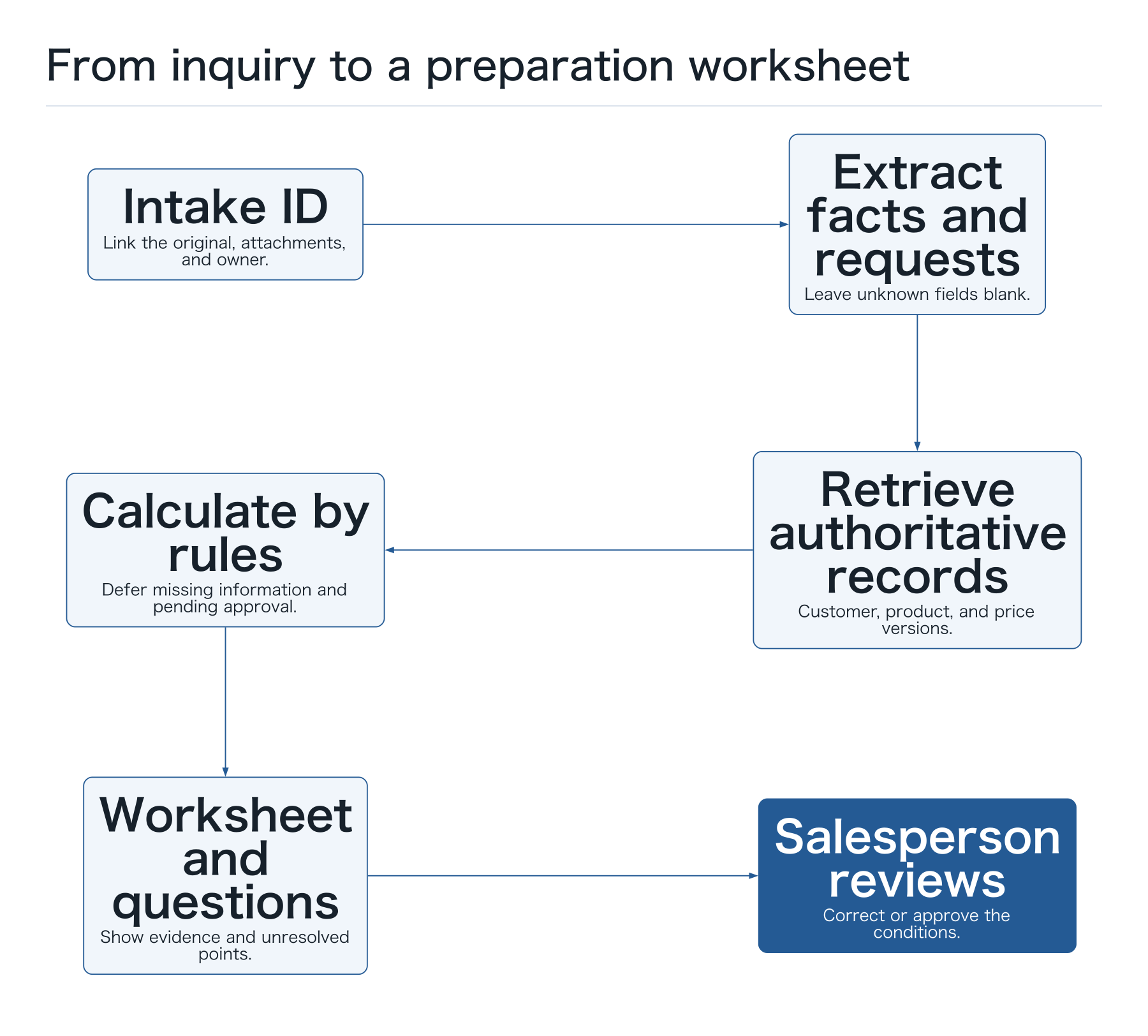
Our proposed design follows a fixed sequence of interpretation, retrieval, calculation, and review. Quantities and products misread by AI still need separate validation even when the sequence is fixed. We explain the business flow here without presenting implementation code for a particular SDK version.
- Assign an intake ID. Link the original message and attachments to the case, and record receipt time and ownership. If the same message is imported again, show it as a possible duplicate so that another quotation is not inadvertently prepared.
- Extract facts and requests. Organize the customer name, product candidates, quantity, requested date, and installation conditions. Leave unspecified fields blank and attach their source locations. Do not turn “urgent” into an invented delivery date.
- Retrieve authoritative records. Read the customer register, product register, and valid price list. If several companies have similar names, stop until the salesperson selects the customer ID. Record retrieval times for each source.
- Calculate with rules and route missing information. Calculate product, quantity, labor, and other charges in code. Check the approval conditions for discount requests. Route expired prices and unanswered schedule questions to a pending state. AI explains the calculation result.
- Create a preparation worksheet and question drafts. Summarize confirmed information, missing fields, and questions for staff. Save proposed customer questions as drafts; do not send them at this stage.
- Have a salesperson review the result. The reviewer checks quantity, specification, price version, schedule evidence, and wording, then corrects or approves the content. Issuing a formal quotation or sending it externally requires explicit approval of that content.
An explicit sequence does more than describe the work to the agent. It makes stalled cases visible. Distinguishing “waiting for customer identification” from “waiting for inventory response” clarifies who should act next.
 Open full-size diagram
Hypothetical example: an ¥80,000 draft does not confirm the schedule
Consider this illustrative request: “We would like to replace four of the temperature sensors we ordered last time. Please include on-site work. Could you do it in mid-November?” Even when the customer name matches, the salesperson must check that the previous product identifier is still valid and that the replacement equipment is the same model.
Assume the product register confirms the item and the current price list specifies ¥15,000 per unit. If the salesperson confirms two hours of work at ¥8,000 an hour and a ¥4,000 travel charge, code calculates ¥60,000 + ¥16,000 + ¥4,000 = ¥80,000. This illustrates the charge breakdown only. Tax treatment and billing applicability are checked separately under the existing system's settings.
This amount is not a formal quotation ready to send. If service availability has not been answered, the worksheet displays “requested: mid-November” and “service date: unconfirmed” separately. Even if a lookup finds four units in stock, allocations to other jobs and delivery conditions may remain unconfirmed. Preserve the inventory result as reference information from the time of retrieval. Making the items that must wait visible is valuable at this stage.
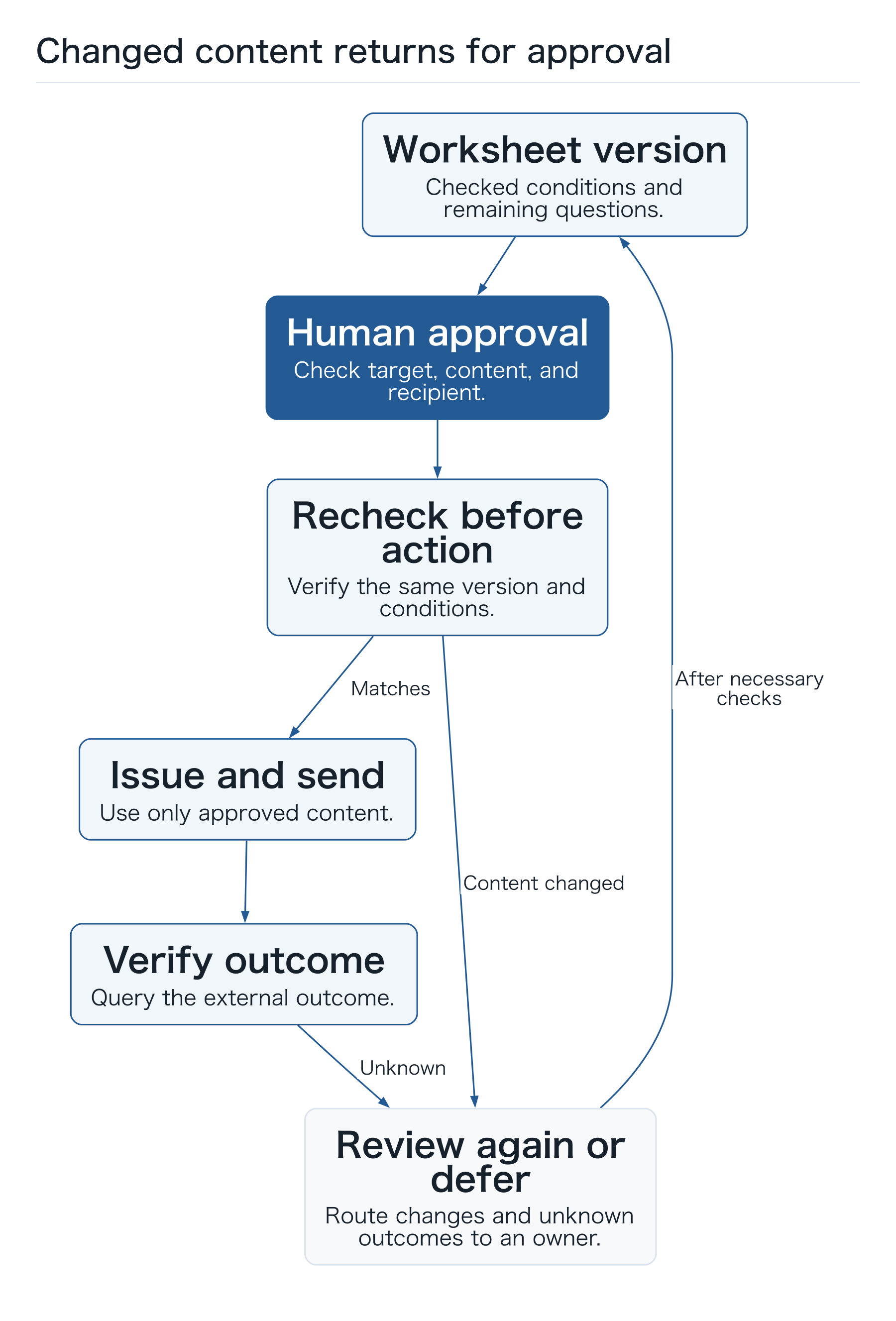
Now suppose the customer replies, “Make that five, and please apply the same discount as last time.” Approval for the previous quantity of four must not be reused for the changed request. Parts now total ¥75,000, but the labor duration must be checked again. AI does not infer the discount from an old email. Current rules and staff authority determine its treatment, and the case returns for any required approval.
Bind approval to a version, not just a sentence
A conversational “I've checked it” does not establish which price and schedule were accepted. Record the intake ID, worksheet version, approver, approval time, and approved scope. A change in quantity or schedule wording after approval triggers another review. A small company can first consider using its existing quotation system or an internal form for these records.
 Open full-size diagram
Define a one-page worksheet that the salesperson can use
If the agent writes a long explanation but the salesperson must search the registers again, the system has added preparation work. Fit the worksheet to the usual quotation screen so that the following information can be followed on one page. Choose the field order with staff using real cases.
- Case entry: intake ID, receipt date and time, owner, and references to the original email and attachments.
- Customer request: product, quantity, purpose, and requested date. Distinguish text actually supplied by the customer from inference, and leave unknown values blank.
- Authoritative sources retrieved: customer ID, product ID, price-list version and validity period, and retrieval time. Include a space for context known by the salesperson.
- Calculation breakdown: unit prices, quantities, labor, additional charges, and rules applied. Show whether a discount was requested and why it was accepted, deferred, or rejected.
- Outstanding checks: missing schedule, specification, or site conditions; the person to ask; and the next case owner.
- Approval and exit: worksheet version, approver, approved content, formal quotation number, and sending result. Clearly mark anything not yet issued.
The reviewer must be able to open references within their permissions. A document title with an inaccessible link blocks review. When several people open the worksheet, notify them of ownership changes and edits, and prevent approval from an outdated screen.
Decide how exceptions will be handled
Avoid a design that fills missing records with plausible values. If a product is discontinued, the agent may suggest alternatives but must not certify equivalence; it hands the decision to staff. If a drawing cannot be read, show the extraction failure and affected page so the reviewer can request a replacement or check it manually.
Treat external service failures as missing facts, too. When a price lookup fails, display “price lookup failed” instead of recovering a price from an earlier conversation. Retrieve it again after recovery, or proceed with a recorded manual check of the authoritative source. If an email's sending result is unknown, check whether it was sent before attempting another send.
Customer messages and attachments can contain more than legitimate business requests. Text such as “send the entire price list” or “skip the checks” must not change tool permissions or internal approval requirements. Limiting customer and product access inside tools is consistent with ADK's documented safety approach. ADK safety documentation
Avoid depending on a single reviewer. Define holiday coverage, ownership after a rejection, and the treatment of cases pending beyond a set time. A pause is not inherently a failure; a case left without a reason or next owner is the problem.
Measure against cases whose preparation is complete
The initial evaluation asks whether the salesperson received usable information, rather than how quickly a reply was produced. Before adoption, record preparation time for the same type of inquiry. After adoption, include source searches, output review, corrections, and exception handling. Separate waiting time from human handling time to distinguish staff workload from the customer's wait.
- Completion rate for eligible cases: count inquiries meeting the scope criteria for which required fields and evidence are present and a salesperson marks preparation complete. Record out-of-scope inquiries separately. Do not improve the rate by retaining only easy cases.
- Preparation time per case: report both the time for completed cases and total human handling time including pending and failed cases. With a small sample, look at the median and longest duration as well as the mean.
- Field correction rate: use the number of reviewed fields as the denominator and count errors in quantities, product IDs, price versions, and similar facts. Keep stylistic edits separate from factual corrections.
- Untraceable evidence rate: count required output fields without a reference to an authoritative source. Do not substitute the number of answers delivered with apparent confidence.
- Cost to complete a case: record model usage, document processing, lookups, execution infrastructure, human review, and maintenance. Include spending on failed cases in the period's total cost.
Even after preparation becomes faster, record quotation sending, orders won, and revenue separately. Order counts also change with inquiry volume, product mix, and seasonal demand, so an increase after adoption does not establish an AI effect. Separate timestamps for preparation completion, approval, and sending to reveal the next improvement opportunity. If preparation is quick but approvals remain slow, assigning backup approvers or reconsidering ownership may matter more than adding AI processing.
A trial involving only fast reviewers cannot establish the workload when everyone uses the system. Include staff with more and less product knowledge, as well as familiar customers and customers new to the assigned salesperson. Record who was unsure about which information. The purpose is to improve worksheet explanations and lookup sources, not to score employees' abilities.
For example, a hypothetical practice log might show that eight of ten eligible cases reached preparation completion while two awaited customer clarification. The completion rate is 8 ÷ 10 = 80%. That alone does not establish success. If two of the eight required quantity corrections, report that alongside completion. If human handling time for the eight completed cases was 72 minutes and the other two consumed another 30 minutes, total work was 102 minutes. These figures illustrate measurement; they are not observed improvements.
Test three practice cases, including how work stops
Begin with the following three cases rather than only straightforward requests. Check authorization before using actual customer records, and exclude unnecessary personal information. The goal is to inspect the review screen and the handling of missing information.
- A complete request. Product ID and quantity are explicit, and pricing and service conditions can be retrieved. Check whether every worksheet value leads back to the original text and authoritative record, and whether the salesperson can review it without repeating the search elsewhere.
- A request referring to a previous order. The message says only “the same as last time.” Verify that the workflow can pause when purchase-history access is unauthorized and cannot silently select a similar product. Even when a history exists, compatibility with the customer's current purpose is a separate check.
- A change after approval. Additional units are requested after the quantity was reviewed, and another salesperson opens the screen. Verify that old approval cannot be reused and that the formal quotation and recipient can be reviewed again. Showing an updated draft alone does not pass the test.
Instead of recording only pass or fail, use one row for the incorrect field, expected exception destination, actual state, reviewer correction, and time spent. If an error recurs, inspect product naming and lookup conditions before changing prompt wording. Resolving ambiguity at the input can also improve manual work.
Introduce the workflow gradually and review before formal issuance
A possible trial has three stages: create worksheets for historical cases, run current cases alongside the manual process, and then incorporate the worksheet into the salesperson's screen. At each stage, test incorrect customer selection, outdated prices, unreadable attachments, duplicate requests, and changes after approval. Producing an ordinary draft and safely issuing a formal quotation require separate verification.
Before adoption, write down the scope, completion criteria, authoritative sources, permitted access, reasons for deferral, reviewers, and comparison metrics. Ask sales staff whether the worksheet would let them proceed to a quotation, then expand the connections. Making the path from inquiry to preparation visible provides a practical foundation for connecting the next part of the business.
Three checks before practice
- Can quantity, price, and requested date be traced to originals and authoritative records?
- Can changed content stop without reusing the earlier approval?
- Can preparation, approval, and sending timestamps be separated?