Automating SME work and infrastructure with ADKPart 7 of 11
Managing Cloud Spending and Changes: Agents That Respect Cost and Permission Boundaries
Connect ADK costs to completed work, distinguish budget alerts and spend caps, and design bounded, approved cloud changes with cost reports and practical review sheets.

In this article
What you will learn
Link usage costs and human review through task IDs.
Separate forecasts, confirmed costs, allocations, and unallocated costs.
Review both billing and business quality after a change.
Part 7 of the series | From cost visibility to approved, bounded changes. Technical information verified as of October 14, 2026.
When the cloud spending forecast increases, the first question is which work consumed the resources and why usage grew. Were there more AI calls, more orders, or a test environment left running? A billing total alone cannot tell you what to change.
A cost-reading agent can connect usage details to business records and help explain possible increases. Moving from analysis to a change requires business impact, permissions, approval, stop conditions, and post-change checks. This article focuses on connecting an understanding of spending to an accountable decision about execution.
We continue with Company A, a fictional equipment and parts distributor with 35 employees. Assume that it runs an order service, quotation drafting, and parts of its daily checks in the cloud. Workloads, cost classifications, and operating conditions are our design examples. They do not represent a particular price list, actual bill, or achieved saving.
1. Apply Controls from Reported Operations to Cost Management
Google SRE's AI operations material describes execution-frequency limits, stop mechanisms, dry runs, dedicated identities, and least privilege. These are its operating controls, not a list that ADK automatically supplies on its own. Google SRE's published material
For an SME, the useful sequence is to define targets and stopping behavior before increasing execution. When spending rises, check the business meaning of an AI-proposed candidate and turn it into a change plan, rather than immediately stopping it.
This article covers reviewing possible causes of spending and assessing necessary changes. Evaluate feature prototypes, analysis of historical bills, and production operations involving changes separately. Google's scale or outcomes do not become results achieved by our fictional company.
2. Look at Both Business and Operational Costs
Company A avoids putting everything into one “AI cost” category. It examines resources consumed by business task. Quotation drafting involves more than model calls: attachment extraction, product retrieval, draft storage, and human review also matter.
Daily checks involve log searches, metric retrieval, text generation, report storage, notifications, and human rechecks. Human handling time, which does not appear on a cloud bill, also affects the decision to continue. Check whether a short report requires rereading large logs every time.
Area: Business volume
Records to collect: Intake, completion, deferral, and returned work counts
What they help distinguish: More usage versus more difficult work
Area: Models and external APIs
Records to collect: Calls, tokens, and target actions
What they help distinguish: Repeated work and unnecessary loops
Area: Execution and storage
Records to collect: Run time, storage, and query volume
What they help distinguish: Ongoing costs and reasons for growth
Area: Human review
Records to collect: Review, correction, and exception-handling time
What they help distinguish: The burden remaining after automation
Area: Maintenance
Records to collect: Updates, evaluations, and support time
What they help distinguish: The cost of keeping the system operating
Together, these records distinguish growth caused by more work from heavier processing per item or more human review due to deferred cases. A total-spend target alone can lead to removing processing needed for orders and quotations.
3. Record Attribution and Aggregation Conditions in Reports
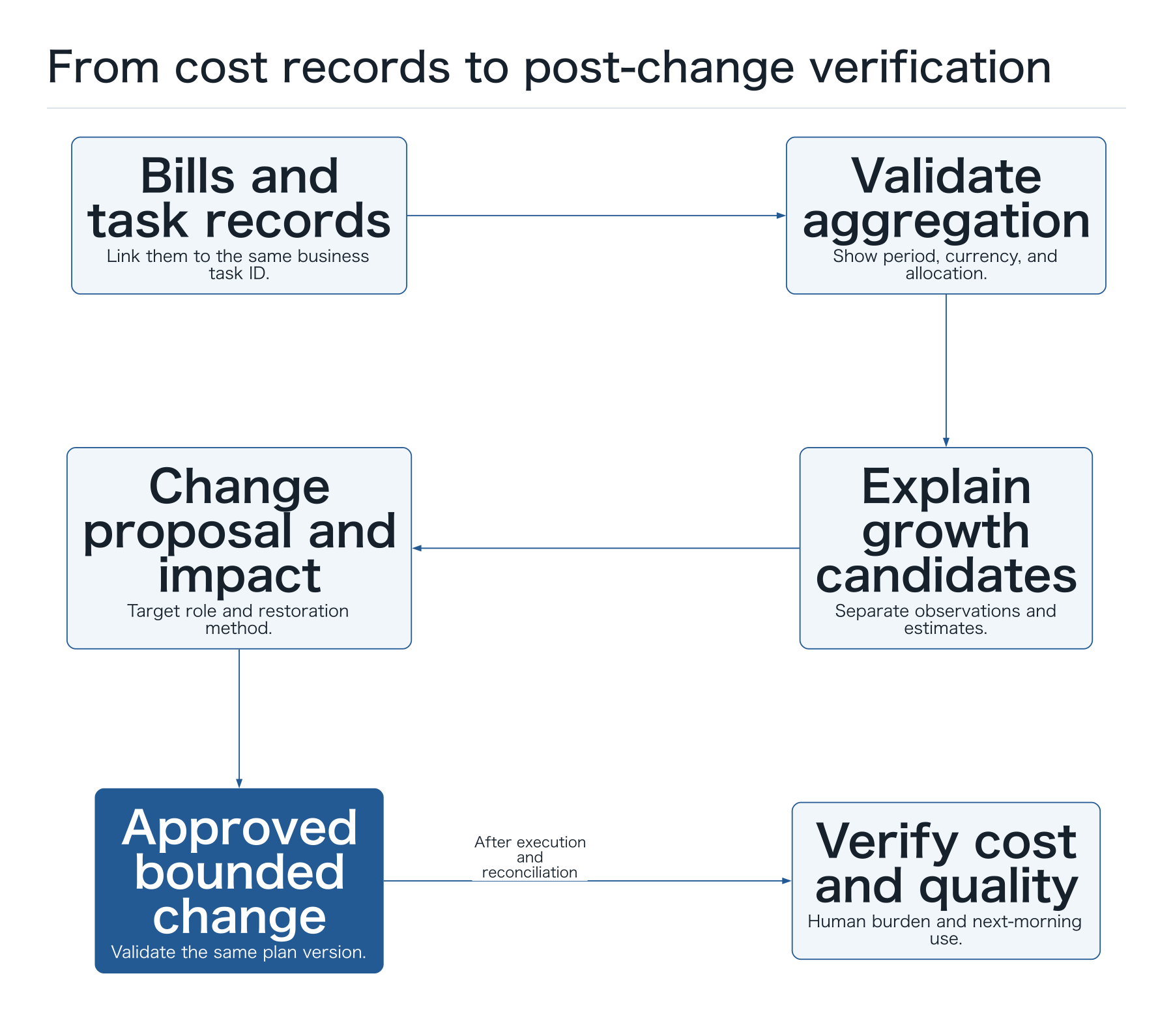
The aggregation register includes business task ID, execution ID, task type, environment, department, start and end, and completion state. This connects usage records to the work that caused them. Link failures and retries to the original business task ID.
When reconciling bills with executions, state the service, period, currency, and treatment of discounts or adjustments. If shared infrastructure is allocated across tasks, define a rule such as execution time and display it separately from directly attributable costs. Leave unmatched amounts explicitly unallocated.
Suppose the cost of quotation work is C and the number of drafts reviewed and received during the same period is N. C÷N gives cost per completed draft. C containing model costs alone has a different meaning from C that also includes infrastructure and human review. State the numerator and denominator on the report, and show the result as undefined when N is zero.
Company A's report separates direct usage costs, allocated shared costs, human time, unallocated amounts, and exclusions. Do not add records with different currencies or periods without adjustment. Where conversion is necessary, record its date and method. The design does not let AI fill in a convenient rate.
Following One Draft into the Cost Report
Assign a business task ID to the quotation inquiry received by sales. Record draft generation, regeneration, and product lookups under separate execution IDs. An execution handed back to someone because an attachment could not be read still belongs in the cost total. For this report, the task completes when the responsible person checks the conditions and receives the draft. Do not reinterpret that metric as completion of sending a quotation to the customer.
Illustrative report: The scope is quotation drafting. States are completed, awaiting review, and retrieval failed. Usage cost covers the billing details obtained. Some shared costs remain unallocated. Human review time appears separately. Show both the aggregation time and the latest billing-data timestamp.
When a pending item carries into the next month, the period in which costs arose may differ from the period in which the task completed. Reviewing both monthly incurred costs and cumulative costs by task helps explain why cost per completion rises in a month with many pending items. Fix the aggregation definitions when using both views.
4. Separate Observations from Estimates of Growth
Ask AI to organize possible causes using task counts, usage, and change history. Label incomplete billing periods as forecast or provisional, with retrieval times. Keep confirmed spending for the month separate from a projection through month-end.
More model usage during a busy sales period is not immediately evidence of waste. Also examine cost per item, returned drafts, and completions. If regeneration increases, investigate missing inputs or inconsistent product data.
If an agent proposes that spending rose because the same document was repeatedly read, verify that against execution IDs and retrieval history. A coherent explanation remains an estimate without evidence. Do not reconstruct prices or usage from the model's memory and enter them into a financial report.
Group improvements into input preparation, narrower retrieval, duplicate prevention, and infrastructure operating hours. When changing models, evaluate effects on quality and review time as well as price. A unit-price comparison alone does not establish a lower cost of completing the business task.
 Open full-size diagram
5. Distinguish Budget Alerts, Spend Caps, and Job Limits
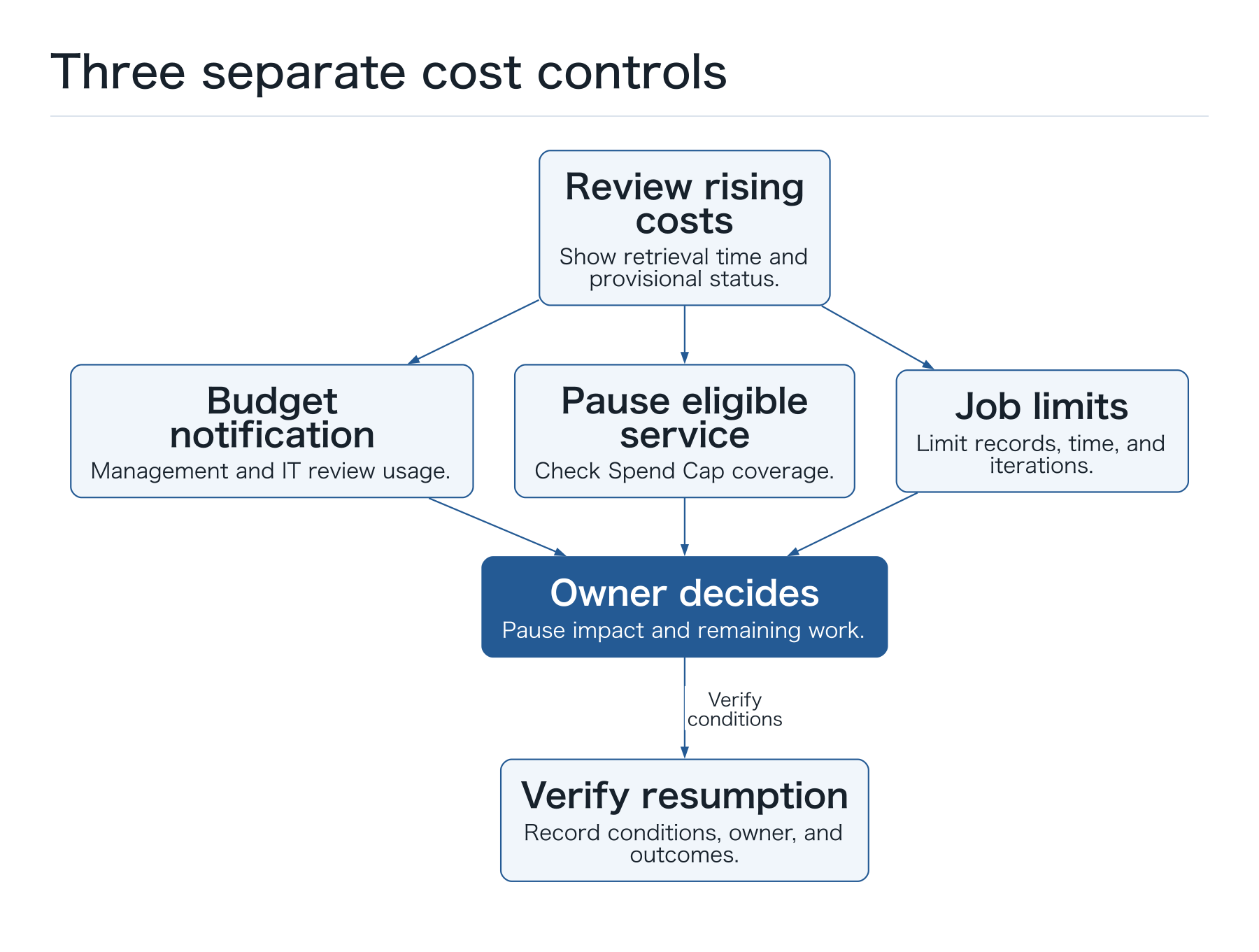
Cloud Billing's regular alerts-only budgets provide notifications. Official budget and alert documentation
Current spend cap budgets cover one eligible service in one project on a monthly basis. They can pause new usage after the limit is reached, but enforcement is not immediate; in-flight requests and ongoing fixed costs of persistent resources receive different treatment. This does not guarantee that all spending remains below an absolute cap. Official spend cap documentation
Company A designs three separate controls:
- Spending notifications. Inform management and IT about forecasts and usage. Decide who reads them and makes the decision.
- Pausing eligible-service usage. Check spend cap coverage and business impact, then define its scope and the person responsible for restoration.
- Task-level execution limits. Bound records read, time, repetition, and external actions for each investigation or draft.
Putting order acceptance and experimental AI under the same pause scope can affect necessary business operations when prototype spending grows. Examine purpose, environment, permissions, and dependencies to identify exactly which usage should stop. Decide who checks the impact after a pause and how service resumes.
Operate these settings with the refresh times of spending and usage data in mind. Job-level quantity and time limits should continue to work while billing data is delayed. Recheck service eligibility and conditions before publication and deployment.
 Open full-size diagram
6. Connect ADK Limits to Business Stop Conditions
ADK RunConfig can limit LLM calls per run through max_llm_calls. A call count is not a monetary ceiling or a limit for the whole business workflow. ADK: Runtime Configuration
Company A's initial design separately bounds documents used, generation iterations, elapsed time, and external API calls for one draft. When a limit is reached, hand over the draft produced so far, references, and unverified conditions. Record task state so that cases over the limit are not automatically resumed repeatedly.
Stop conditions also include unavailable product data, inputs that differ from those approved, unverified recipients, and requests outside permission scope. A visible reason lets the person decide whether to add information or process an exception.
For overnight aggregation, identify duplicates using the target date and task ID and preserve progress when processing stops partway through. Check the register and external outcomes on resume to avoid repeated notifications or entries. If a limit is lifted, record the responsible person, reason, and duration.
7. Start with a Test Environment Whose Role Is Known
In our example, the owner proposes reviewing overnight operation of a test environment. A resource name containing “dev” is not enough to approve stopping it. Check the environment register, actual users, job timing, dependencies, and the maintenance provider's planned work.
A test environment might produce data needed for the next morning's orders, support overnight integration tests, or be used by a provider in another time zone. Low utilization is a reason to investigate, not a reason to skip the role check.
The proposed change aligns one authorized environment's operating hours with a schedule agreed by stakeholders. Present the before-and-after schedule, target IDs, users, start time, next-morning startup checks, and recovery procedure on one page. Separate savings that depend on actual reductions in usage during those hours from fixed costs that remain.
Verify one target, observe its behavior, and exercise restoration before broadening the scope. This is our proposed staged approach; it does not prescribe the same target or hours for every company.
8. Separate Analysis Permissions from Change Permissions
Give the analytical agent permission to read necessary billing and usage records. Execute changes through a bounded, dedicated tool and credentials. Producing an analysis does not require a combined grant for stopping, deleting, and assigning permissions.
The execution tool validates allowed environments and resource IDs, action types, target counts, timing, and frequency. A user naming another project in free text must not expand the authorized scope. For customer-specific information, validate the relationship between user and target at retrieval.
Insufficient permissions should not cause an agent to grant itself broader administrative access. Record the rejected action, target, and review contact, then return to the approved permission-change procedure. Keep credentials and unnecessary customer data out of investigation logs.
Separate analysis and execution owners where possible. Where a small team combines them, record the capacity in which the person approved and executed the change. Aim for a permission and responsibility scope that remains understandable during absences and external handoffs.
9. Separate Planning, Approval, Execution, and Verification
As in the incident-response article, approval belongs to a concrete plan. Save the operation ID, targets, plan version, diff, expected effect, impact, stop conditions, restoration method, approver, and expiry. An AI statement that a plan is approved does not authorize execution.
- Verify the target's role and current state.
- Show the proposal and impact, then check planned differences with a dry run.
- Have an authenticated approver review the same plan version.
- Reread state immediately before execution; return for review if it has changed.
- Perform the permitted action under one operation ID.
- Reconcile external results with the register and verify next-morning use.
If the response times out, query external state before resending the change. Hand over an unknown outcome when it cannot be established. Bound attempts and waiting periods even for retries of temporary errors.
Use unique keys and conditional updates, for example, to avoid competing start registrations. The register and external change are separate operations, so include reconciliation. Cancellation and restoration should follow current state and approved procedures. Do not assume that every change can always be reversed.
10. Measure Both Spending and Business Quality Afterwards
Separate projected savings from post-change observations. First check the target's operating hours, task volume, and success of required usage. Then obtain usage details for the same period and scope, and reconcile costs against confirmed information.
In the overnight-operation example, also record delayed testing the next morning, extra startup checks, or waiting imposed on the maintenance provider. If part of the bill decreases but human review or business waiting increases, include that burden in the continuation decision.
When order volume or working days differ before and after, the total-cost difference alone cannot compare outcomes. Use consistent definitions for tasks, operating time, cost per item, failures, and human time. Record concurrent changes and retain uncertainty about which improvement caused an observed difference.
Define reversal criteria before the change. If required processing cannot progress, morning availability misses its deadline, or an owner cannot verify state, proceed to the approved restoration and impact checks. A cost objective must not override business completion criteria.
11. Evaluate Cost-Management Exceptions
Use test billing and register data to verify the following. Mark monetary data as test data rather than presenting it as an actual bill.
- An incomplete period whose billing records have not all arrived.
- A failed business process with zero completions.
- Resent execution records that appear to duplicate cost.
- Shared costs that cannot be mapped to a department or task.
- Legitimate busy-period growth mistakenly classified as abnormal.
- An important integration running on a target named as a test environment.
- A changed target version or use schedule after approval.
- A missing pause or resume response that leaves the outcome unknown.
Do not evaluate only whether the agent produced a savings idea. Check whether it identified missing evidence, stopped unauthorized changes, and returned material a person can judge. A suitable deferral is a valid operational result.
Record proposals, evidence, acceptance or rejection reasons, execution outcomes, and the time when cost data became final. Explaining why an action stopped and what changed is a condition for continued use.
12. Your Cost and Change Design Worksheet
Choose one task and one environment, then complete the following:
- Outcome to protect: Work that must still complete after a cost change.
- Cost attribution: Task IDs, execution IDs, direct costs, allocation, and unallocated amounts.
- Report conditions: Period, currency, retrieval time, and confirmed versus forecast values.
- Notifications: Which conditions require whom to decide by when.
- Spend cap: Eligible service, scope, business impact of a pause, and restoration owner.
- Job limits: Time, records, iterations, external actions, and handoff at a limit.
- Change proposal: Target IDs, roles, diff, dry run, and expected impact.
- Approval and permissions: Plan version, approver, expiry, and permitted actions.
- Execution and results: Unique keys, register, retries, and queries for unknown outcomes.
- Continuation decision: Measured costs, business quality, human time, and reversal conditions.
Start by handing the worksheet and analytical report to a reviewer before connecting cost-reduction actions. Once attribution and explanations are stable, add bounded changes to targets whose roles have been confirmed. Checking each stage is easier when analysis and execution do not expand together.
At the weekly cost review, management, business, and IT representatives read the same report. Management reviews spending and continuation; business owners check necessary processing and waiting; IT examines repeated work and incidents. Even when different people understand prices and usage, make sure they are looking at the same scope and period. If much remains unallocated or unverified, assign an owner and deadline to repair the records before tightening savings targets.
The final article organizes these designs into a 90-day plan for trials, evaluation, and ongoing use. Align cost, quality, and ownership to decide what to continue and when to stop.
To review cloud spending and change procedures, share your target task, current reporting approach, and difficult change candidates with KONDAX. A concrete design helps examine what costs mean and how changes affect the business.
Three checks before practice
- Do cost and completion counts use matching periods and scopes?
- Have the candidate’s role, dependencies, and users been checked?
- Can changed state after approval or an unknown outcome stop the process?